
Z-Ordering Support#
To improve query speed, Kyuubi supports Z-Ordering to optimize the layout of data stored in all kind of storage with various data format.
Introduction#
The following picture shows the workflow of z-order.
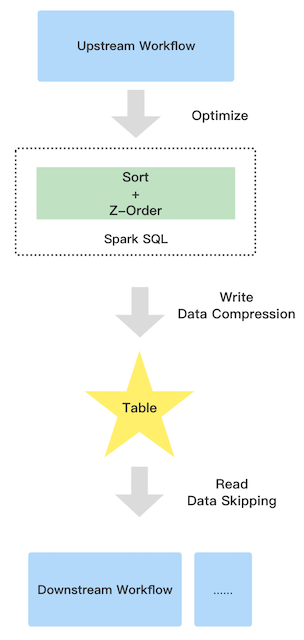
It contains three parties:
Upstream
Due to the extra sort, the upstream job will run a little slower than before
Table
Z-order has the good data clustering, so the compression ratio can be improved
Downstream
Improve the downstream read performance benefit from data skipping. Since the parquet and orc file support collect data statistic automatically when you write data e.g. minimum and maximum values, the good data clustering let the pushed down filter more efficient
Supported table format#
| Table Format | Supported |
|---|---|
| parquet | Y |
| orc | Y |
| json | N |
| csv | N |
| text | N |
Supported column data type#
| Column Data Type | Supported |
|---|---|
| byte | Y |
| short | Y |
| int | Y |
| long | Y |
| float | Y |
| double | Y |
| boolean | Y |
| string | Y |
| decimal | Y |
| date | Y |
| timestamp | Y |
| array | N |
| map | N |
| struct | N |
| udt | N |
How to use#
This feature is inside Kyuubi extension, so you should apply the extension to Spark by following steps.
add extension jar:
copy $KYUUBI_HOME/extension/kyuubi-extension-spark-3-5* $SPARK_HOME/jars/add config into
spark-defaults.conf:spark.sql.extensions=org.apache.kyuubi.sql.KyuubiSparkSQLExtension
Optimize history data#
If you want to optimize the history data of a table, the OPTIMIZE ... syntax is good to go. Due to Spark SQL doesn’t support read and overwrite same datasource table, the syntax can only support to optimize Hive table.
Syntax#
OPTIMIZE table_name [WHERE predicate] ZORDER BY col_name1 [, ...]
Note that, the predicate only supports partition spec.
Examples#
OPTIMIZE t1 ZORDER BY c3;

OPTIMIZE t1 ZORDER BY c1,c2;

OPTIMIZE t1 WHERE day = '2021-12-01' ZORDER BY c1,c2;
Optimize incremental data#
Kyuubi supports optimize a table automatically for incremental data. e.g., time partitioned table. The only things you need to do is adding Kyuubi properties into the target table properties:
ALTER TABLE t1 SET TBLPROPERTIES('kyuubi.zorder.enabled'='true','kyuubi.zorder.cols'='c1,c2');
the key
kyuubi.zorder.enableddecide if the table allows Kyuubi to optimize by z-order.the key
kyuubi.zorder.colsdecide which columns are used to optimize by z-order.
Kyuubi will detect the properties and optimize SQL using z-order during SQL compilation, so you can enjoy z-order with all writing table command like:
INSERT INTO TABLE t1 PARTITION() ...;

INSERT OVERWRITE TABLE t1 PARTITION() ...;

CREATE TABLE t1 AS SELECT ...;
Benchmark#
For this test, we used aliyun Databricks Delta test case https://help.aliyun.com/document_detail/168137.html?spm=a2c4g.11186623.6.563.10d758ccclYtVb.
Overview#
Prepare data for the three scenarios:
10 billion data and 2 hundred files (parquet files): for big file(1G)
10 billion data and 1 thousand files (parquet files): for medium file(200m)
1 billion data and 10 thousand files (parquet files): for smaller file(200k)
Test env: spark-3.1.2 hadoop-2.7.2 kyuubi-1.4.0
Test step:
Step1: create hive tables.
spark.sql(s"drop database if exists $dbName cascade")
spark.sql(s"create database if not exists $dbName")
spark.sql(s"use $dbName")
spark.sql(s"create table $connRandomParquet (src_ip string, src_port int, dst_ip string, dst_port int) stored as parquet")
spark.sql(s"create table $connOrderbyOnlyIp (src_ip string, src_port int, dst_ip string, dst_port int) stored as parquet")
spark.sql(s"create table $connOrderby (src_ip string, src_port int, dst_ip string, dst_port int) stored as parquet")
spark.sql(s"create table $connZorderOnlyIp (src_ip string, src_port int, dst_ip string, dst_port int) stored as parquet")
spark.sql(s"create table $connZorder (src_ip string, src_port int, dst_ip string, dst_port int) stored as parquet")
spark.sql(s"show tables").show(false)
Step2: prepare data for parquet table with three scenarios, we use the following code.
def randomIPv4(r: Random) = Seq.fill(4)(r.nextInt(256)).mkString(".")
def randomPort(r: Random) = r.nextInt(65536)

def randomConnRecord(r: Random) = ConnRecord(
  src_ip = randomIPv4(r), src_port = randomPort(r),
  dst_ip = randomIPv4(r), dst_port = randomPort(r))
Step3: do optimize with z-order only ip and do optimize with order by only ip, sort column: src_ip, dst_ip and shuffle partition just as file numbers.
INSERT overwrite table conn_order_only_ip select src_ip, src_port, dst_ip, dst_port from conn_random_parquet order by src_ip, dst_ip;
OPTIMIZE conn_zorder_only_ip ZORDER BY src_ip, dst_ip;
Step4: do optimize with z-order and do optimize with order by, sort column: src_ip, src_port, dst_ip, dst_port and shuffle partition just as file numbers.
INSERT overwrite table conn_order select src_ip, src_port, dst_ip, dst_port from conn_random_parquet order by src_ip, src_port, dst_ip, dst_port;
OPTIMIZE conn_zorder ZORDER BY src_ip, src_port, dst_ip, dst_port;
The complete code is as follows:
./spark-shell
import org.apache.spark.SparkConf
import org.apache.spark.sql.SparkSession

case class ConnRecord(src_ip: String, src_port: Int, dst_ip: String, dst_port: Int)

val  conf  = new SparkConf().setAppName("zorder_test")
val spark = SparkSession.builder().config(conf).enableHiveSupport().getOrCreate()
import spark.implicits._

val sc = spark.sparkContext
sc.setLogLevel("WARN")
//ten billion rows and two hundred files
val numRecords = 10*1000*1000*1000L
val numFiles = 200

val dbName = s"zorder_test_$numFiles"
val baseLocation = s"hdfs://localhost:9000/zorder_test/$dbName/"
val connRandomParquet = "conn_random_parquet"
val connZorderOnlyIp = "conn_zorder_only_ip"
val connZorder = "conn_zorder"
spark.conf.set("spark.sql.shuffle.partitions", numFiles)
spark.conf.get("spark.sql.shuffle.partitions")
spark.conf.set("spark.sql.hive.convertMetastoreParquet",false)
spark.sql(s"drop database if exists $dbName cascade")
spark.sql(s"create database if not exists $dbName")
spark.sql(s"use $dbName")
spark.sql(s"create table $connRandomParquet (src_ip string, src_port int, dst_ip string, dst_port int) stored as parquet")
spark.sql(s"create table $connOrderbyOnlyIp (src_ip string, src_port int, dst_ip string, dst_port int) stored as parquet")
spark.sql(s"create table $connOrderby (src_ip string, src_port int, dst_ip string, dst_port int) stored as parquet")
spark.sql(s"create table $connZorderOnlyIp (src_ip string, src_port int, dst_ip string, dst_port int) stored as parquet")
spark.sql(s"create table $connZorder (src_ip string, src_port int, dst_ip string, dst_port int) stored as parquet")
spark.sql(s"show tables").show(false)

import scala.util.Random
// Function for preparing Zorder_Test data
def randomIPv4(r: Random) = Seq.fill(4)(r.nextInt(256)).mkString(".")
def randomPort(r: Random) = r.nextInt(65536)

def randomConnRecord(r: Random) = ConnRecord(
src_ip = randomIPv4(r), src_port = randomPort(r),
dst_ip = randomIPv4(r), dst_port = randomPort(r))

val df = spark.range(0, numFiles, 1, numFiles).mapPartitions { it =>
val partitionID = it.toStream.head
val r = new Random(seed = partitionID)
Iterator.fill((numRecords / numFiles).toInt)(randomConnRecord(r))
}

df.write
.mode("overwrite")
.format("parquet")
.insertInto(connRandomParquet)

spark.read.table(connRandomParquet)
.write
.mode("overwrite")
.format("parquet")
.insertInto(connZorderOnlyIp)

spark.read.table(connRandomParquet)
.write
.mode("overwrite")
.format("parquet")
.insertInto(connZorder)
spark.stop()
Z-order Optimize statement:
set spark.sql.hive.convertMetastoreParquet=false;

OPTIMIZE conn_zorder_only_ip ZORDER BY src_ip, dst_ip;

OPTIMIZE zorder_test.conn_zorder ZORDER BY src_ip, src_port, dst_ip, dst_port;
ORDER BY statement:
INSERT overwrite table conn_order_only_ip select src_ip, src_port, dst_ip, dst_port from conn_random_parquet order by src_ip, dst_ip;

INSERT overwrite table conn_order select src_ip, src_port, dst_ip, dst_port from conn_random_parquet order by src_ip, src_port, dst_ip, dst_port;
Query statement:
set spark.sql.hive.convertMetastoreParquet=true;

select count(*) from conn_random_parquet where src_ip like '157%' and dst_ip like '216.%';

select count(*) from conn_zorder_only_ip where src_ip like '157%' and dst_ip like '216.%';

select count(*) from conn_zorder where src_ip like '157%' and dst_ip like '216.%';
Z-order vs Order By Sort#
Compare the efficiency of Z-order Optimize versus Order by Sort.
10 billion data and 1000 files and Query resource: 200 core 600G memory
Z-order by or order by only ip:
| Table | row count | optimize time |
|---|---|---|
| conn_order_only_ip | 10,000,000,000 | 1591.99 s |
| conn_zorder_only_ip | 10,000,000,000 | 8371.405 s |
Z-order by or order by all columns:
| Table | row count | optimize time |
|---|---|---|
| conn_order | 10,000,000,000 | 1515.298 s |
| conn_zorder | 10,000,000,000 | 11057.194 s |
Z-order vs Random order#
Compare the efficiency of querying Z-order optimized data versus random data order.
10 billion data and 200 files and Query resource: 200 core 600G memory
| Table | Average File Size | Scan row count | Average query time | row count Skipping ratio |
|---|---|---|---|---|
| conn_random_parquet | 1.2 G | 10,000,000,000 | 27.554 s | 0.0% |
| conn_zorder_only_ip | 890 M | 43,170,600 | 2.459 s | 99.568% |
| conn_zorder | 890 M | 54,841,302 | 3.185 s | 99.451% |
10 billion data and 1000 files and Query resource: 200 core 600G memory
| Table | Average File Size | Scan row count | Average query time | row count Skipping ratio |
|---|---|---|---|---|
| conn_random_parquet | 234.8 M | 10,000,000,000 | 27.031 s | 0.0% |
| conn_zorder_only_ip | 173.9 M | 53,499,068 | 3.120 s | 99.465% |
| conn_zorder | 174.0 M | 35,910,500 | 3.103 s | 99.640% |
1 billion data and 10000 files and Query resource: 10 core 40G memory
| Table | Average File Size | Scan row count | Average query time | row count Skipping ratio |
|---|---|---|---|---|
| conn_random_parquet | 2.7 M | 1,000,000,000 | 76.772 s | 0.0% |
| conn_zorder_only_ip | 2.1 M | 406,572 | 3.963 s | 99.959% |
| conn_zorder | 2.2 M | 387,942 | 3.621s | 99.961% |